
Download Encord – AI Model Evaluation & Active Learning Tool
Overview
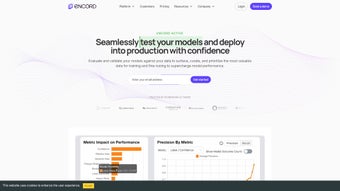
Encord Active is a web‑based, secure platform built for machine‑learning and computer‑vision developers who need a reliable way to evaluate, curate, and improve their AI models. The tool shines in three core areas: model evaluation, data curation, and active learning. By connecting directly to your datasets, Encord runs exhaustive robustness checks, surfaces failure modes, and generates explainability reports that help you understand why a model behaves the way it does. Its label‑validation engine guarantees high‑quality training data, allowing you to build balanced, bias‑aware datasets that match the needs of your specific model architecture. The collaborative workspace also streamlines communication between developers and labeling teams, making error reporting fast and actionable. Whether you’re preparing a computer‑vision model for production or iterating on a research prototype, Encord provides the metrics, visualisations, and feedback loops required to push performance beyond the usual benchmarks.
Key Features
- Robust Model Evaluation: Automated test suites run against custom datasets, delivering precision, recall, and IoU scores with visual heatmaps that pinpoint weak spots.
- Active Learning Loop: The platform suggests the most informative unlabeled samples, reducing annotation effort while maximizing model gains.
- Label Validation & Curation: Real‑time validation checks catch inconsistent or missing labels, and batch tools let you rebalance classes on the fly.
- Explainability Reports: Integrated SHAP and Grad‑CAM visualisations explain predictions, helping teams meet compliance and audit requirements.
- Collaboration Hub: Comment threads, issue tagging, and role‑based permissions keep developers and annotators aligned throughout the project lifecycle.
- Scalable Cloud Architecture: Hosted on secure AWS/GCP environments, Encord scales from a few hundred images to multi‑petabyte video streams without performance loss.
- Continuous Integration Ready: RESTful APIs and webhooks allow you to embed evaluation steps directly into CI/CD pipelines.
Installation & Usage Instructions
Encord Active is delivered as a SaaS solution, so there is no traditional installer to download. To get started, follow these steps:
- Sign‑up for an account: Visit the Encord website, click “Get Started,” and fill in your professional email. A verification link will be sent to confirm your identity.
- Choose a subscription tier: Free trials are available for 14 days. After the trial, select the plan that matches your data volume and team size.
- Create a new project: Inside the dashboard, click “New Project,” name it, and upload your dataset (images, videos, or point‑cloud files). Encord supports common formats such as JPEG, PNG, MP4, and TFRecord.
- Configure evaluation settings: Define the model you wish to test (upload a TensorFlow SavedModel, PyTorch .pt, or ONNX file). Set metrics, confidence thresholds, and any custom loss functions.
- Run the evaluation: Click “Start Evaluation.” The platform will process your data, generate performance dashboards, and highlight outliers.
- Activate the active learning loop: Enable “Suggest Samples.” Encord will return a ranked list of unlabeled frames that are most likely to improve model accuracy when annotated.
- Collaborate and iterate: Use the built‑in comment system to discuss problematic samples with your labeling team. Apply batch corrections, re‑run the evaluation, and monitor metric improvements in real time.
The web interface is responsive and works on modern browsers such as Chrome, Edge, and Firefox. For power users, a CLI tool is available via npm (npm install -g encord-cli) to automate dataset uploads and trigger evaluations from scripts.
Compatibility, Pros & Cons
Because Encord Active is a cloud‑native web application, it runs on any operating system with a supported browser—Windows 10/11, macOS Ventura and later, Linux distributions, as well as mobile browsers on Android 9+ and iOS 13+. The optional CLI works on Windows, macOS, and Linux environments that have Node.js 14+ installed.
Pros
- Zero‑install, instantly accessible from any device.
- Comprehensive evaluation metrics and visual explanations.
- Active learning reduces labeling cost by up to 60 % in many projects.
- Robust collaboration tools keep data scientists and annotators in sync.
- Scalable infrastructure handles small research sets and enterprise‑level video streams.
Cons
- Being SaaS, offline work is not possible; an internet connection is required.
- Advanced features (e.g., custom API integrations) are limited to higher‑tier plans.
- Initial onboarding may be steep for teams unfamiliar with active‑learning concepts.
Review Summary: Encord Active delivers a powerful, end‑to‑end solution for AI model evaluation and data curation. Its strengths lie in automation, explainability, and collaboration, while the primary drawbacks are the reliance on an internet connection and a learning curve for new users.
Frequently Asked Questions
Is there a free version of Encord Active?
Yes, Encord offers a 14‑day free trial with full feature access. After the trial, you can continue with a paid subscription or downgrade to a limited‑feature free tier, which still allows basic model evaluation.
Can Encord integrate with my existing CI/CD pipeline?
Absolutely. Encord provides RESTful APIs and webhooks that can be called from Jenkins, GitHub Actions, GitLab CI, or any other automation tool. This enables automated model testing on every code push.
What data formats are supported for upload?
Encord accepts image formats (JPEG, PNG, BMP), video formats (MP4, AVI, MOV), and annotation files in COCO, Pascal VOC, and YOLO formats. For large video streams, you can also upload TFRecord or custom binary packs.
How does the active learning suggestion engine work?
The engine calculates uncertainty scores (e.g., entropy, margin) for each unlabeled sample based on the current model. It then ranks samples and returns the top‑N most informative items, which, when annotated, are expected to improve model accuracy the most.
Is my data secure on Encord’s cloud platform?
Security is a core priority. Encord uses AES‑256 encryption at rest, TLS 1.3 for data in transit, and offers role‑based access control. Compliance certifications include ISO 27001 and SOC 2.
Conclusion & Call to Action
Encord Active stands out as a comprehensive, secure, and highly scalable solution for anyone serious about elevating their AI models. Its blend of robust evaluation metrics, active‑learning automation, and collaborative features reduces both time‑to‑market and annotation costs. If you’re looking to validate models before production, improve dataset quality, or simply gain deeper insights into failure modes, Encord provides a ready‑made toolkit that integrates smoothly into modern development workflows. Download Encord today, start your free trial, and experience a smarter way to build reliable computer‑vision applications.



.png)



